How to create event ticket add-ons
Event add-ons can be used for ticket upgrades or selecting options.
For example an event may have a standard ticket price of £50 but a drinks package could be an additional £25. This feature becomes more powerful if there are multiple ticket types, as the upgrade can be applied to any of these by the guest.
Please follow these steps to create an add-on for your event.
First select ‘Add-ons’ within the Product data section of the Event’s product page within Fuse. Then choose ‘Checkboxes’ from the available option list.
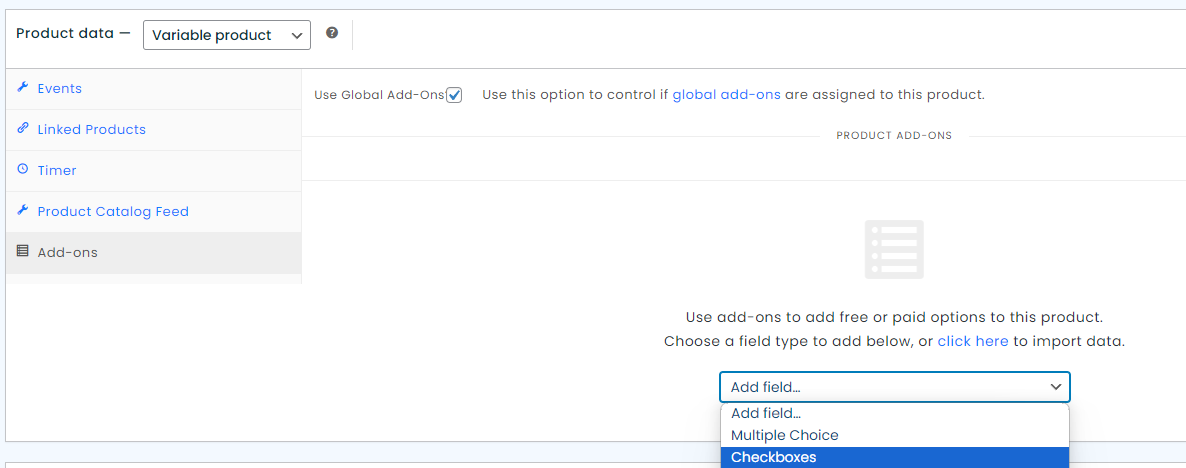
The panel will now reveal more options as per the screenshot below.
In ‘Title’ you must type ‘Upgrade’, ‘Dietary Option’, ‘Drink Option’ or ‘Ticket Options’ for the add-ons to be included on Guest Lists. If you need a different title please contact support.
‘Option Title’ can be anything you like and will be displayed on the order and all customer communication, for this example we are using ‘Add Drinks Package.
Finally select ‘Quantity Based’ under the ‘Type’ options and enter the price.
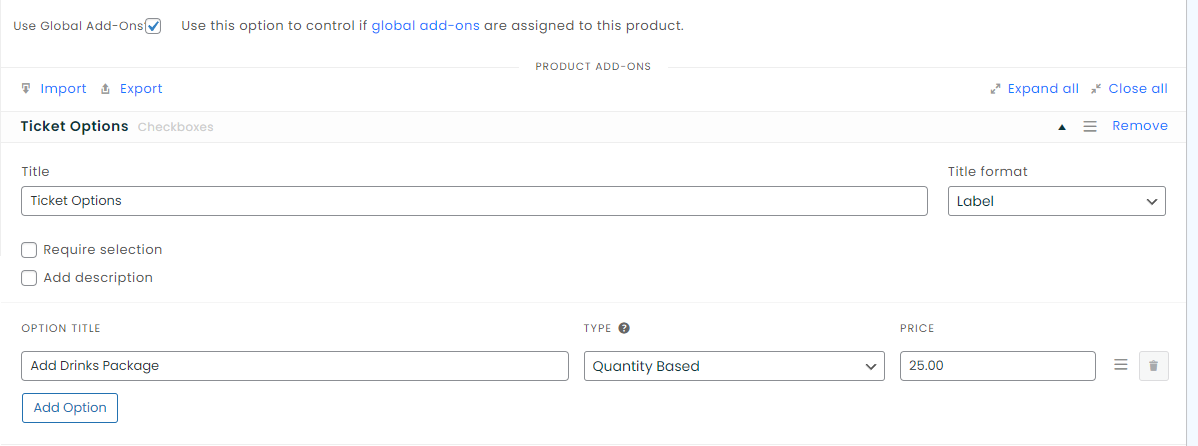
If you would like to add multiple options to an event simply click the ‘Add Option’ button then add the Option Title, Type and Price for each.
Once you’ve added your add-ons please remember to save the event product.