How can we help?
-
Gift Vouchers
-
Event Ticketing
-
- Event Dates
- Event Time Display
- Export Waitlist Guests
- How can I change amount of tickets available?
- How do I add an event date to existing event?
- How do I set an event date as sold out?
- How to add a PDF Menu
- How to add an Abandoned Cart Message?
- How to add Event Tags
- How to add Event Testimonials
- How to create event ticket add-ons
- How to move a customer's order to a different date
- How to set a Refund Cutoff
- How to set Event Capacity
- How to set maximum tickets sold per order
- How to set up Event Locations
- How to Up Sell (You may also like)
- Remove all Events from What's On Page
- Ticket Types
- Show Remaining Articles (4) Collapse Articles
-
-
General
How to set up Event Locations
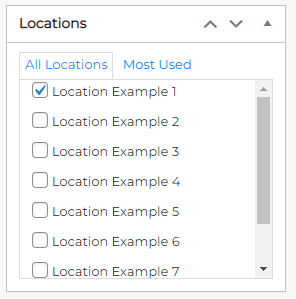
Click on the location relevant to the event on the right hand side of the product edit screen. Once the event location is selected this will be used to display map, address, booking link (if a non-Fuse event) and the email address will be used to send new order/refund notifications.
The setup for locations are in Fuse CMS > Locations which is outside of the standard menu system. For help please contact support.