How can we help?
-
Gift Vouchers
-
Event Ticketing
-
- Event Dates
- Event Time Display
- Export Waitlist Guests
- How can I change amount of tickets available?
- How do I add an event date to existing event?
- How do I set an event date as sold out?
- How to add a PDF Menu
- How to add an Abandoned Cart Message?
- How to add Event Tags
- How to add Event Testimonials
- How to create event ticket add-ons
- How to move a customer's order to a different date
- How to set a Refund Cutoff
- How to set Event Capacity
- How to set maximum tickets sold per order
- How to set up Event Locations
- How to Up Sell (You may also like)
- Remove all Events from What's On Page
- Ticket Types
- Show Remaining Articles (4) Collapse Articles
-
-
General
How do I link products for upsell or cross-sell?
Select the product you want to link from then select ‘Linked Products’ to review the options for upsells and cross-sells.

Upsells – are displayed on product pages.
Cross-sells – are displayed during checkout on the cart page.
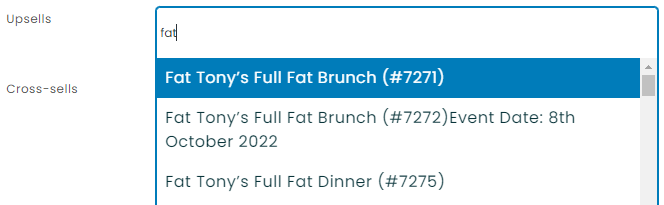
As you start to type in the name of your product you will see the matching products appear underneath to choose from. Simply click on the event you wish to promote.
Once your products have been selected they will be displayed as below.

When you have finished editing your product don’t forget to save.
Here’s an example of two upsells on a product page.