How can we help?
-
Gift Vouchers
-
Event Ticketing
-
- Event Dates
- Event Time Display
- Export Waitlist Guests
- How can I change amount of tickets available?
- How do I add an event date to existing event?
- How do I set an event date as sold out?
- How to add a PDF Menu
- How to add an Abandoned Cart Message?
- How to add Event Tags
- How to add Event Testimonials
- How to create event ticket add-ons
- How to move a customer's order to a different date
- How to set a Refund Cutoff
- How to set Event Capacity
- How to set maximum tickets sold per order
- How to set up Event Locations
- How to Up Sell (You may also like)
- Remove all Events from What's On Page
- Ticket Types
- Show Remaining Articles (4) Collapse Articles
-
-
General
How to move a customer’s order to a different date
To move a customer’s order to a different date first select their order. Then just under the event details in their order you’ll see a button ‘Change Date’.
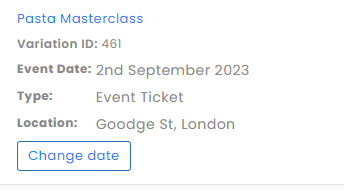
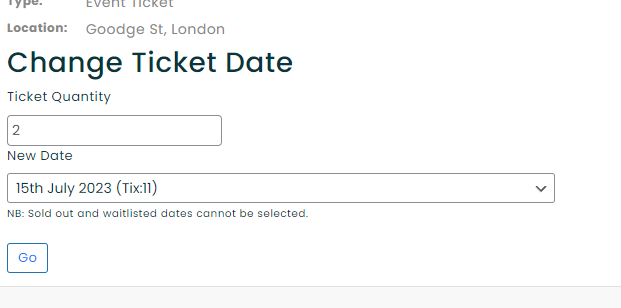
If you click on the ‘Change Date’ button there will be a new form displayed like below.
Here you can select how many of the already purchased tickets can be moved. Then in the dropdown you can choose the event date to move to.
In the event dates selections if the date has no capacity left it will be marked in red. The number of tickets (Tix) available for event is also shown.
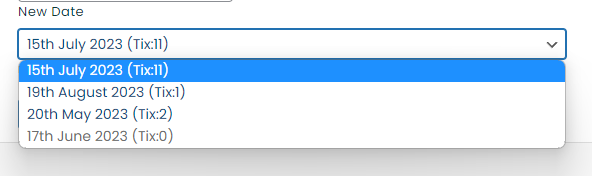
Once you have selected the options you require simple press the ‘Go’ button.