How can we help?
-
Gift Vouchers
-
Event Ticketing
-
- Event Dates
- Event Time Display
- Export Waitlist Guests
- How can I change amount of tickets available?
- How do I add an event date to existing event?
- How do I set an event date as sold out?
- How to add a PDF Menu
- How to add an Abandoned Cart Message?
- How to add Event Tags
- How to add Event Testimonials
- How to create event ticket add-ons
- How to move a customer's order to a different date
- How to set a Refund Cutoff
- How to set Event Capacity
- How to set maximum tickets sold per order
- How to set up Event Locations
- How to Up Sell (You may also like)
- Remove all Events from What's On Page
- Ticket Types
- Show Remaining Articles (4) Collapse Articles
-
-
General
Send customer receipt
If a customer does not receive their email receipt when an order is placed you can resend from the order detail screen.
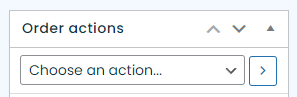
Once you have found the order you wish to refund click on ‘Choose an action’.
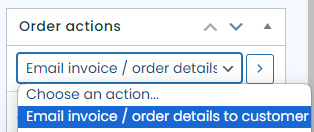
Then select ‘Email invoice / order details to customer’ and click the arrow button next to your selection.
The order will reload and an email will be sent to the customer’s email address they entered when placing the order.